Curriculum
CCTV Installation Fundamentals
Introduction
0/1
Module 1: Introduction to Surveillance Systems
0/6
Module 2: Planning & Site Survey
0/4
Module 3: Cabling, Connectors & Power
0/3
Module 4: Hardware Assembly & Component Connections
0/4
Module 5: Hardware Installation, Setup & System Configuration
0/6
Module 6: System Testing, Maintenance, Troubleshooting & Safety
0/5
Final Exam
0/2
Text lesson
Lesson 4.2: IP Camera Connection (PoE Switch Setup)
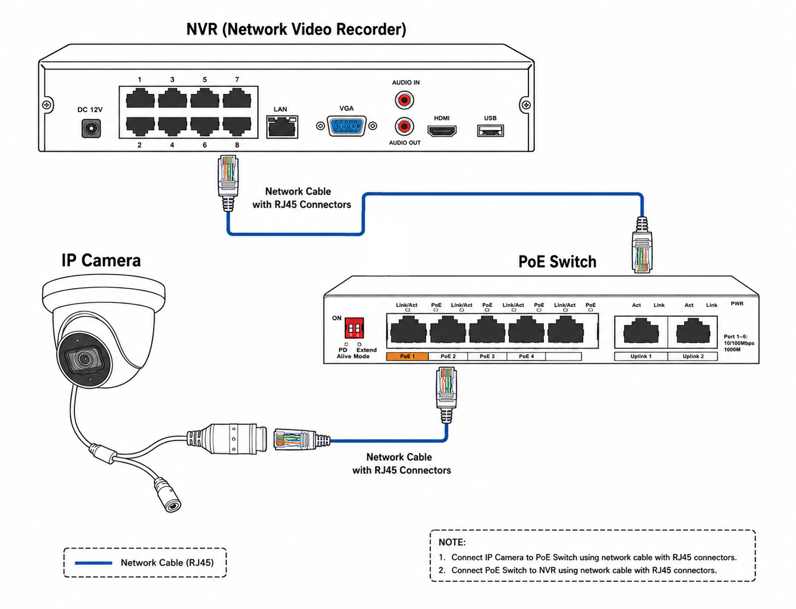
IP Camera Connection (PoE Switch):
An IP camera system connects using Ethernet cabling (CAT5e/CAT6) terminate with RJ45 connectors
Components Needed:
- IP Camera
- NVT
- Network Cable (Cat5e/CAT6)
- PoE Switch
Connection Process:
- Crimp RJ45 Connectors on both cable ends.
-
Plug one end of the CAT5e/CAT6 network cable (RJ45 standard T568B) into the IP camera’s network port
-
Plug the other end of the network cable into a PoE port on the PoE switch
-
Connect the PoE switch to the Network Video Recorder (NVR) or local area network (LAN)
-
The PoE switch transmits both digital video data and operating power to the camera over the single network cable, eliminating the need for a separate DC power supply at the camera.