Curriculum
CCTV Installation Fundamentals
Introduction
0/1
Module 1: Introduction to Surveillance Systems
0/6
Module 2: Planning & Site Survey
0/4
Module 3: Cabling, Connectors & Power
0/3
Module 4: Hardware Assembly & Component Connections
0/4
Module 5: Hardware Installation, Setup & System Configuration
0/6
Module 6: System Testing, Maintenance, Troubleshooting & Safety
0/5
Final Exam
0/2
Text lesson
Lesson 5.1: Recorder Mounting & Hard Drive Installation
Mounting the Recorder
-
Install the DVR/NVR in a secure, well-ventilated area
-
Avoid placing the unit near heat sources
-
Ensure a dust-free environment to prolong component lifespan
Installing the Hard Drive
-
Pre-Installation Planning: Confirm drive capacity matches the number of cameras, recording resolution, frame rate, recording mode, and required retention period
-
Continuous recording uses more storage than motion-based or scheduled recording.
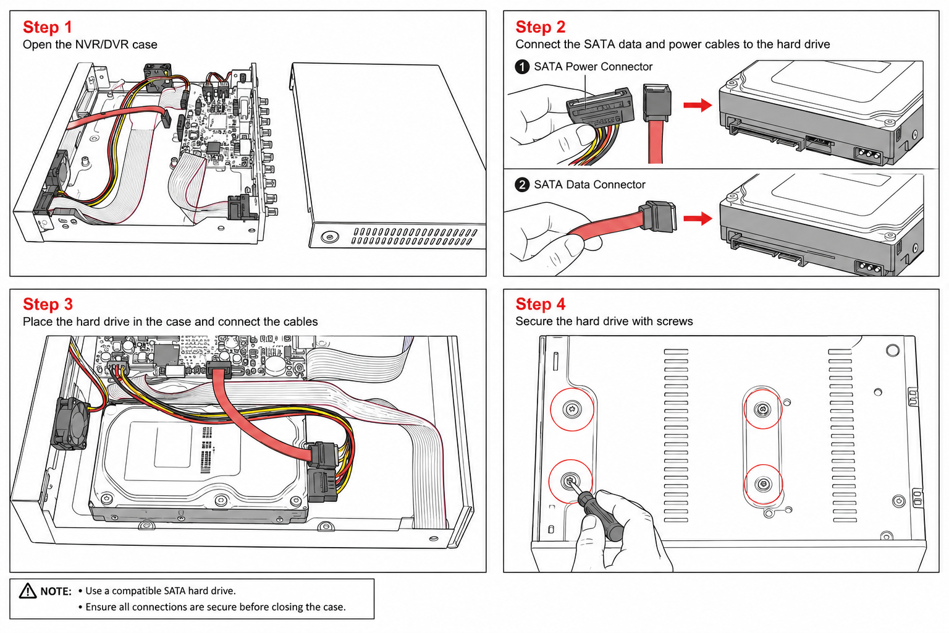
HDD Installation Steps:
-
Open the DVR/NVR enclosure
-
Connect the SATA power cable and SATA data cable to the Hard Drive
-
Connect the opposite ends of the SATA power and data cables to the recorder motherboard
-
Mount and secure the HDD to the base of the enclosure using the included screws
-